
Overview
The Settings & Configuration in Recurio section allows you to control how subscriptions behave across your WooCommerce store. From enabling customer self-service to managing billing cycles, retries, and email notifications, Recurio provides flexible configuration options to match your business model.
This guide walks you through all Recurio settings, explains what each option does, and shares best-practice recommendations.
Accessing Recurio Settings
Navigate to: WordPress Admin → Recurio → Settings
You will find the following settings tabs:
- General
- Billing
- Emails
Each tab controls a specific part of the subscription system.
General Settings
Path: Recurio → Settings → General
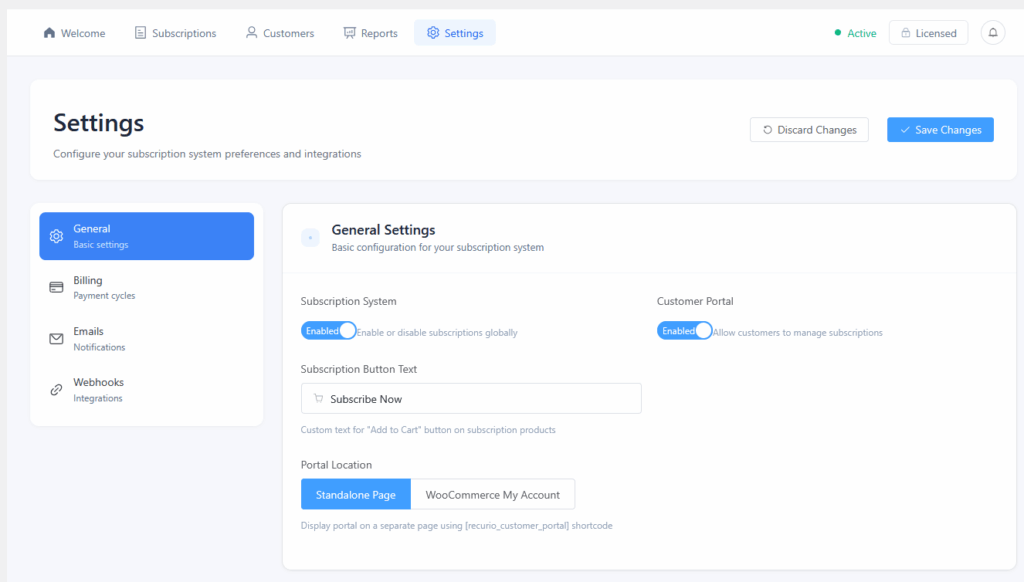
Subscription System
| Setting | Description |
|---|---|
| Enable Subscription System | Master switch to enable or disable all subscription functionality |
| Enable Customer Portal | Allows customers to manage subscriptions themselves |
| Subscription Button Text | Custom text for subscription products (default: “Subscribe Now”) |
💡 Best Practice: Keep the subscription system enabled at all times once live to avoid accidental service interruptions.
Customer Portal Configuration
| Setting | Description | Default |
|---|---|---|
| Portal Location | Where the customer portal appears | Standalone Page / WooCommerce My Account |
| My Account Endpoint | URL slug for My Account tab | subscriptions |
| Navigation Label | Menu label shown to customers | Subscriptions |
Standalone Page Shortcode
[recurio_customer_portal]
Optional parameter:
[recurio_customer_portal show_cancelled="yes"]
Billing Settings
Path: Recurio → Settings → Billing
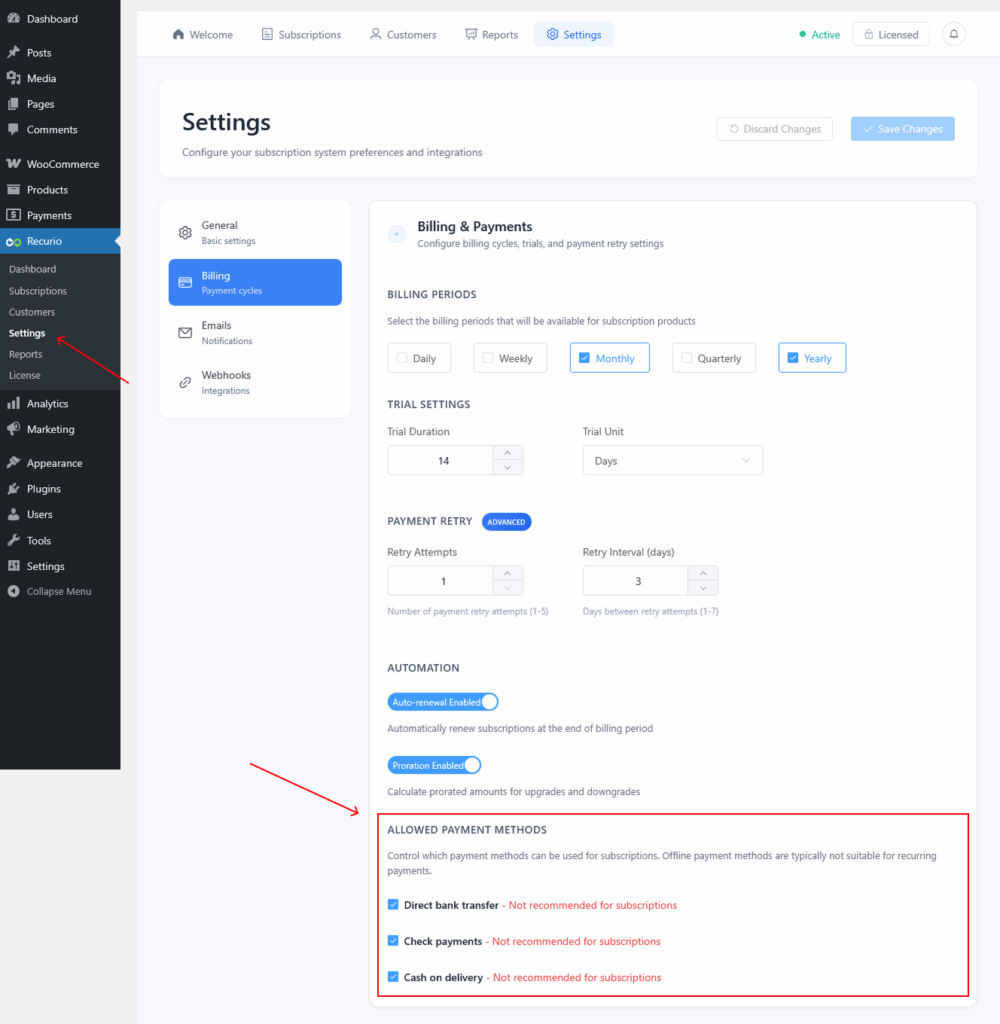
Billing Periods
Select which billing periods can be used for subscription products.
| Period | Availability |
|---|---|
| Monthly | FREE |
| Yearly | FREE |
| Daily | PRO |
| Weekly | PRO |
| Quarterly | PRO |
Custom billing intervals (e.g., every 2 months, every 3 years) are supported.
Trial Settings
| Setting | Description |
|---|---|
| Trial Duration | Default length of trial |
| Trial Unit | Days, Weeks, or Months |
Example:
14 + Days = 14-day free trial before first charge.
Payment Retry (Dunning)
| Feature | FREE | PRO |
|---|---|---|
| Retry Attempts | 1 | 2–5 |
| Retry Interval | Fixed (3 days) | Configurable (1–7 days) |
How it works:
- Payment fails
- Retry scheduled
- Customer notified
- Subscription cancelled after max retries
💡 Pro Tip: 3–5 retries recover up to 60% of failed payments.
Allowed Payment Methods
Choose which WooCommerce gateways can be used for subscriptions.
Recommended
- Stripe
- PayPal
- Square
- Authorize.net
Not Recommended
- Cash on Delivery
- Bank Transfer
- Check Payments
⚠️ Subscriptions require tokenization for automated renewals.
Email Settings
Path: Recurio → Settings → Emails
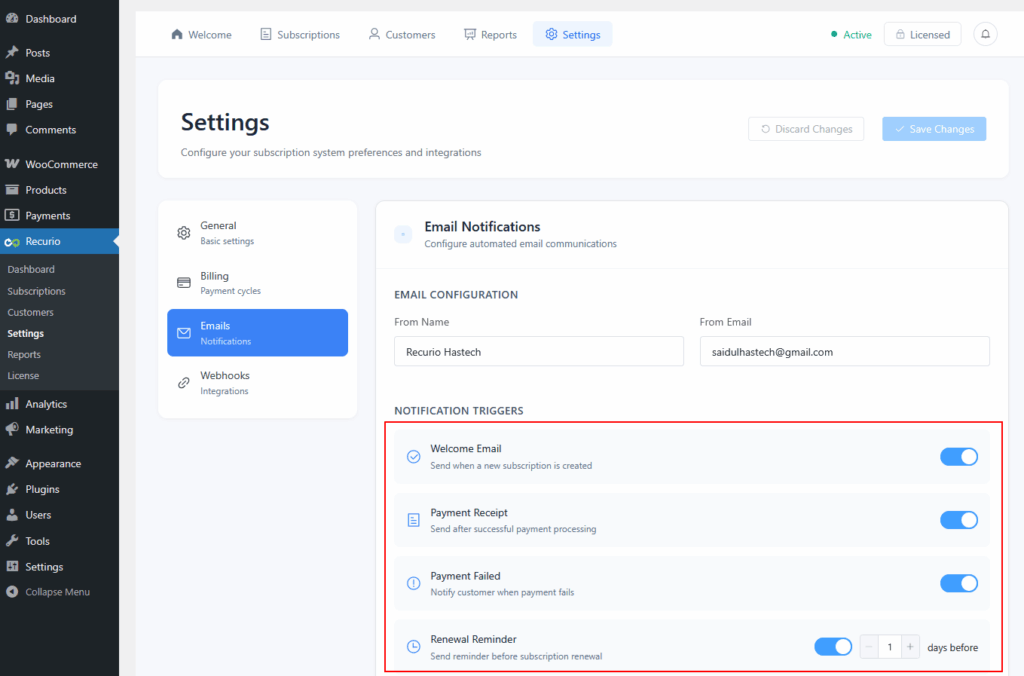
Email Sender Configuration
| Setting | Example |
|---|---|
| From Name | Acme Subscriptions |
| From Email | [email protected] |
FREE Email Notifications
You can enable or disable each notification independently.
| Notification | Trigger |
|---|---|
| Welcome Email | Subscription created |
| Payment Receipt | Successful payment |
| Payment Failed | Failed charge |
| Renewal Reminder | X days before renewal |
| Subscription Paused | Paused by admin/customer |
| Subscription Resumed | Reactivated |
| Subscription Cancelled | Cancelled |
| Subscription Expired | Trial or limited plan ended |
PRO Email Automation 🔒
Available in Recurio PRO:
- Smart Dunning Campaigns
- Trial Ending Reminders
- Win-Back Campaigns
- Card Expiration Alerts
- Pause Reactivation Emails
- Anniversary Emails
Automation Settings (PRO)
Path: Recurio → Settings → Billing
| Setting | Description |
|---|---|
| Auto-Renewal | Enables automated recurring billing |
| Proration | Calculates partial charges for plan changes |
| Grace Period | Allows delayed cancellation after failure |
| Smart Retry Logic | Advanced retry scheduling |
Saving and Applying Settings
After making changes:
- Click Save Changes
- Clear cache (if applicable)
- Test with a sample subscription
⚠️ Some changes (billing periods, retries) only apply to new subscriptions.
Recommended Configuration (Best Practices)
For Most Stores
- Monthly + Yearly billing
- Renewal reminder: 7 days
- Retry attempts: 3 (PRO)
- Customer portal enabled
- SMTP email configured
For SaaS & Memberships
- Enable pause instead of cancel
- Use trial ending reminders
- Enable proration (PRO)
Common Configuration Issues
| Issue | Solution |
|---|---|
| Portal not visible | Enable Customer Portal + flush permalinks |
| Emails not sending | Configure SMTP |
| Renewals not charging | Verify tokenized gateway |
| Settings not saving | Check user permissions |
Conclusion
Proper Settings & Configuration in Recurio ensures stable billing, fewer payment failures, and a better customer experience. Once configured correctly, Recurio runs reliably in the background while your subscription business scales.